
Only administrators have access to case management. All cases entered in the system have a pending case status and low priority. An administrator must review and change the case status from Pending to Open. Cases must be in Open status before the Ledger calculates and populates the case.
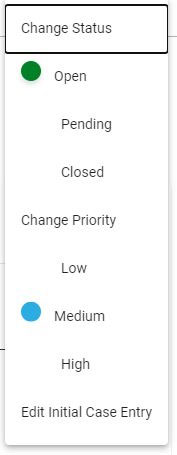
To manage an Impact Case, click on the impact case number that needs to be managed and review the case. After reviewing the case, click on the Manage Case button.
Opening a Case
To open a case, click on Open. A green dot will appear next to Open when the status is changed. A popup will appear in the right corner of the screen confirming the change was updated.
Closing a Case
A case should only be closed after the case is completed and the business owner requests closure. A business owner will have a Request Case Closer button on their impact case.
To close the case, go to Case Management and click on Closed. A red dot will appear next to Closed when the status is changed.
Changing Priority
To change the priority, click on the priority level (Low, Medium, or High). When the level is selected, a blue dot will appear next to the level.