
There are two types of ledgers: an Impact Ledger and a Case Ledger. The Impact Ledger appears on the Dashboard and the Districts page. The Case Ledger appears on the individual impact case page.

The Impact Ledger is the global ledger that calculates from the data entered into the case ledgers. The ledger consists of 4 sections: Filter, Report, List, and Download.
Filtering the Ledger
The Choose an Incident to View Related Cases selection box impacts the ledger. Make sure the appropriate incident is selected before filtering the ledger.

The filter default setting is set to calculate all data from all cases unless there are changes made to the filter. The filter contains three filter boxes for District, Impact Level, and Status. Adjusting the filters will automatically change the Report and List sections of the ledger based on the selections that were made to the filter.
To filter the ledger, click on a filter box. A dropdown will appear with all the filters selected.
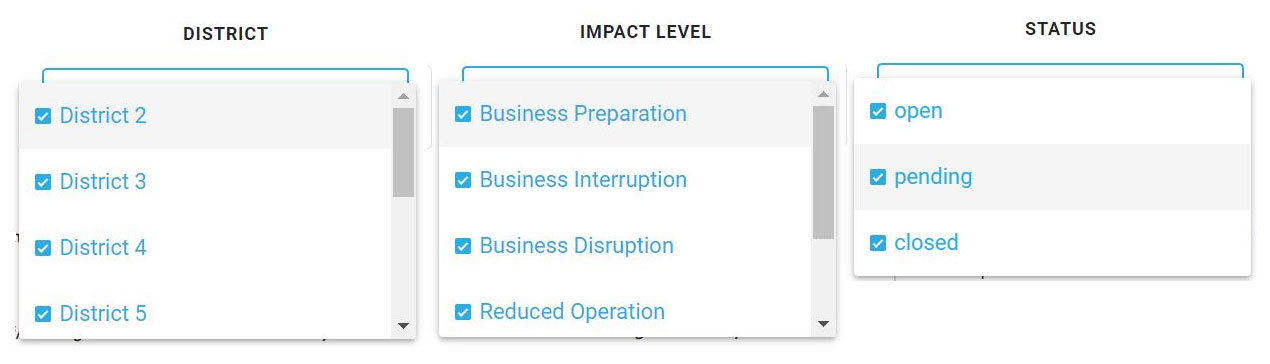
Then, click on all of the selections not wanted in the filter. As the selections are removed, the ledger will automatically adjust.
To reset the filter, click on the Reset Filter button. The filter will reset with all options returning to their default unselected state.
Reports

The report displays the Original Estimated Impact, Insurance Coverage, Insurance Compensation, Total Laid Off/Furloughed, Total Salary Cuts, Average % of Salary Cuts, Actual Impact, Affected Businesses, and Affected Employees of the cases. If the incident is changed or filters are used, the report will update based on the incident and filter selections.
Hovering the cursor over the numbers will display a tooltip. If the number is a million and above, moving the cursor over the number will reveal the exact number.
List
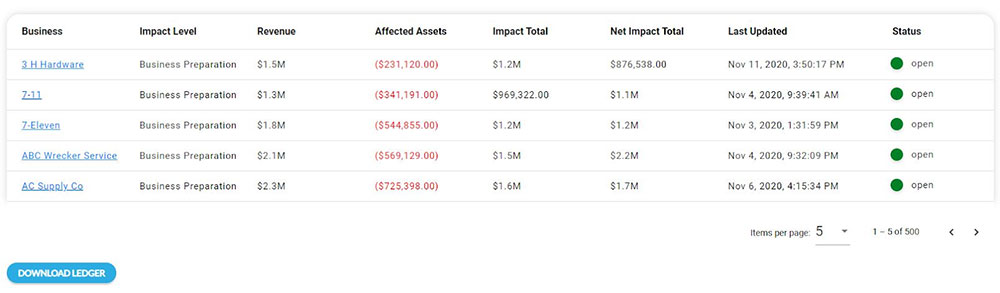
The ledger list displays all of the entries calculated from the Impact Ledger. The list displays information through columns titled: Business, Impact Level, Revenue, Affected Assets, Impact Total, Net Impact Total, Last Updated, and Status. The list can be sorted by clicking on Business, Impact Level, Last Update, or Status. The number of viewable entries can be increased by selecting a new Items Per Page number.
Downloading Ledger
The Impact Ledger can be downloaded to a CSV file by clicking the Download button.

The ledger download will include the Asset Report, Employee Report, Insurance Report, and the Ledger Details and Totals.