
Administrators can view Users, Add Users, Invite Users, Upload a CSV file, complete an Onboard Upload; Add and edit Incidents, Incident Stages, Levels, and Categories; archive Incidents, or view Profile in Settings.
To view the users, click on Users or View All. The Users page will display.
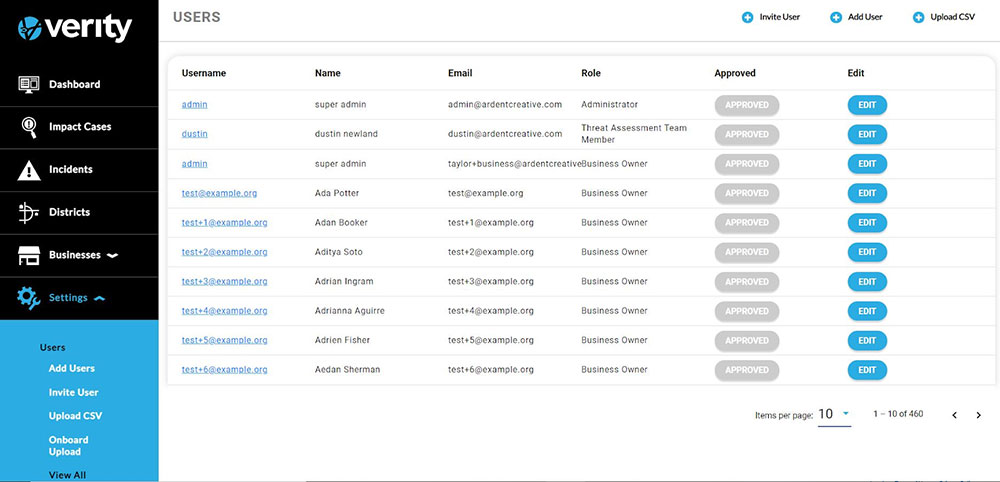
Administrators can view the users who are authorized to access the system. The users’ information is listed in columns: Username, Name, Email, Role, and Approved. The columns are sortable by clicking on the column title.
Users can be edited by clicking on the Edit button in that user’s field. Clicking on Edit will display the user entry form.
The number of viewable users can be increased or decreased by selecting a new Items Per Page number in the bottom right corner.
To review a user’s information, click on the Username and the user’s information page will display.
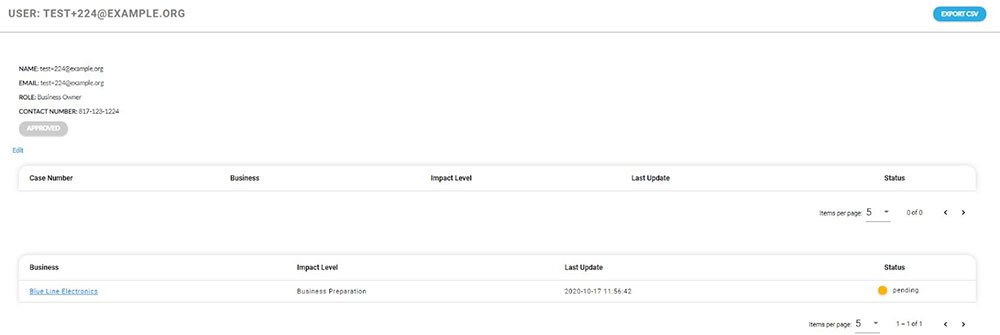
This page contains the user’s information, the cases the user has submitted, and the user’s business. The user’s information can be edited from this page by clicking the Edit button, below Approved.